For farmers, advisers and hauliers
The AgriSync app: your fields and SFI proof, in your pocket
The AgriSync app is a farm app for England.
- Coming soon to Google Play
- Coming soon to the App Store
- Download for Android (APK)
Won’t install? Get help with installing
Free during early access. How to install it, step by step
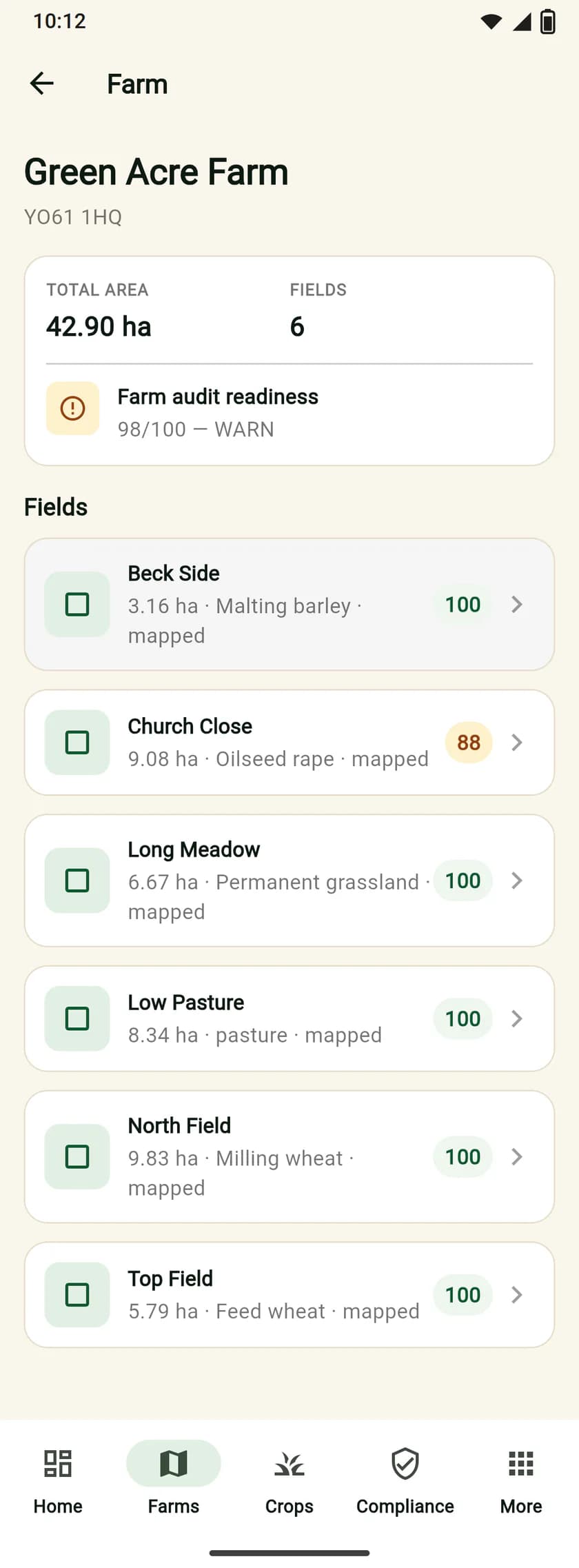
One login, three ways in
Same fields and photos everywhere.
On your phone
Photos in the field, even with no signal. Android now, iPhone soon.
On a computer or iPhone
app.agrisync.co.uk in any browser. Best for records, payments and the PDF.
Our UK team
Phone or email, Monday to Friday, 8am to 6pm. We set up your farm with you.
What can you do in the app?
19 jobs on the phone, 20 in the web app. All live today.
Compare phone and web app
| Job | Phone app | Web app |
|---|---|---|
| Take field photos as proof, filed to the right field | Yes | Yes |
| Keep photos with no signal and send them later | Yes | Needs signal |
| Snap & Verify: find the field you're standing in, by GPS | Yes | Phone app only |
| See all your fields on a map, even with no signal | Yes | Needs signal |
| See your SFI to-do list and fix what's missing | Yes | Yes |
| Bring in your fields from your SBI | Yes | Yes |
| Satellite crop checks for wheat, barley and oilseed rape | Yes | Yes |
| Notifications, like a haulier booking your load | Yes | Yes |
| Post a load with a load passport and QR code | Yes | Yes |
| Hauliers: book a load, collect it and deliver with a photo | Yes | Yes |
| Carbon estimates and load carbon certificates | Yes | Yes |
| Share a farm with your agronomist | Yes | Yes |
| Download your data or delete your account | Yes | Yes |
| Spray, fertiliser and field work records (editing a record: web app) | Yes | Yes |
| Ask AgriSync, the AI helper | Yes | Yes |
| Grain prices and field margins | Yes | Yes |
| Marketplace: sell, post wanted ads, make offers and agree deals | Yes | Yes |
| Invoice export for Xero and QuickBooks | Not yet | Yes |
| Haulage firms: drivers, transport managers and My day | Yes | Yes |
| My SFI agreement: record it, dated jobs and proof for each action | Yes | Yes |
| Change the SFI actions on a recorded agreement | Web app only | Yes |
| Rough SFI26 payments for each field | Not yet | Yes |
| Download the audit PDF for a farm | Not yet | Yes |
“Not yet” jobs work in your phone’s browser. Anyone can browse the marketplace without an account.
Is the app only for farmers?
No. Your team, adviser and haulier can use it too, each seeing only what they need.
Your farm team
Photos and field work. You choose who can do what. Invite your team
Agronomists and land agents
Shared farms, crop checks and advice. SFI records only with the farmer’s yes. For advisers
Hauliers
Find and book loads, prove delivery with a photo. For hauliers
Install on your Android phone
Not on Google Play yet. Download it here in about two minutes.
Free. Version 2.3.1, 94.3 MB. Works on Android 7.0 or newer. Use Wi-Fi if you can.
Install step by step
- 1
Download the app
On your Android phone, tap Download the Android app on this page. On a computer, point your phone's camera at the code instead. If Chrome asks if you want to keep the file, tap Download anyway.
- 2
Open the file
When the download ends, tap Open. Or open the Files app, then Downloads, then tap the AgriSync file.
- 3
Allow the install
Android may say your phone isn't allowed to install unknown apps from this source. Tap Settings. Turn on Allow from this source. Then go back.
- 4
Tap Install
If Play Protect warns you about an app it doesn't know, tap More details, then Install anyway. AgriSync is safe to install when you get it from agrisync.co.uk.
- 5
Open AgriSync and sign in
When it says App installed, tap Open. Sign in with the same email and password as on the web app.
- Coming soon to Google Play
- Coming soon to the App Store
No account yet? Create one free or ask us to set it up with you. Full install guide, with help for each make of phone
Is there an iPhone app yet?
Not yet. The iPhone app is coming soon. Until then, use AgriSync on your iPhone in Safari at app.agrisync.co.uk. You can sign in, see your fields and your SFI to-do list, and add photos. The Android app is a free download from agrisync.co.uk.
Common questions
What app do I need for SFI?
You don't need an app to apply. You apply online through the RPA's Rural Payments service. An app helps after that, with keeping proof. AgriSync files dated field photos against each field. It shows what each field still needs and makes one PDF for an RPA visit. It is free during early access.
Is there an app for SFI evidence?
Yes. AgriSync is an app for farms in England. Take a photo in the field on your Android phone. The app saves where and when you took it. It checks the photo was taken inside that field, and files it there. On an iPhone, use AgriSync in your browser at app.agrisync.co.uk for now.
Can I take SFI photos with no phone signal?
Yes, with the AgriSync Android app. With no signal, the photo is saved on your phone with the time and place you took it. It uploads to the right field by itself when you are back in signal. Farms and fields you have already opened still show. Crop checks and scores need signal.
Is there an AgriSync app for iPhone?
Not yet. The iPhone app is coming soon. Until then, use AgriSync on your iPhone in Safari at app.agrisync.co.uk. You can sign in, see your fields and your SFI to-do list, and add photos. The Android app is a free download from agrisync.co.uk.
Is there a free farm app in the UK?
Yes. AgriSync is free during early access for farms in England. You don't need a card, and there is no limit on farm size. If we bring in paid plans, we will tell you well in advance. You will only pay if you choose a plan.
Does AgriSync send my SFI application to the RPA?
No. AgriSync never sends anything to the RPA. You apply, and make your yearly declaration, through the Rural Payments service. You can do it yourself or through an agent. AgriSync keeps your fields, photos and to-do list ready. It makes a PDF you can show the RPA or your agent.
Can my agronomist see my SFI records in the app?
Only if you say so. In AgriSync, open Advisers and invite your agronomist by email. They see the farm's crop checks and can leave notes. To let them see your SFI to-do list and evidence, press Allow compliance and evidence. That's a separate yes. You can stop either at any time.
Who can I ask if I get stuck with the app?
Our UK team helps by phone and email, Monday to Friday, 8am to 6pm. We can also set up your farm with you. Email info@agrisync.co.uk. There are also step-by-step guides with pictures. For questions about your SFI application itself, call the Rural Payments helpline on 03000 200 301.
New to SFI words like SBI and land parcel? SFI words explained. Want the big picture? How AgriSync works.
Free during early access
Get your farm into the app
We'll phone you and set up your fields with you, or you can start on your own. No card needed.